A small business website in 2026 needs to do a few things very well: load quickly on a phone, say in one line what you do and where, let people call, book or order with one tap, and show real photos of your business. Behind that, it needs a clear page for each service, correct hours and address that match your Google profile, and a domain and accounts that you own. Everything else is a bonus.
Here is the checklist we use when we build or fix a site for a New York business, in the order that matters most.
Start with the phone, not the desktop
Most people will see your website on a phone, often standing on a sidewalk deciding where to go. Design for that screen first. Text should be readable without zooming, buttons should be big enough for a thumb, and nothing important should hide behind a menu that people have to open.
Speed is part of this. A site that takes too long to appear on a subway connection loses the visitor before they see anything. Large uncompressed photos, heavy sliders and pop-ups are the usual causes. A fast, simple page beats a slow, clever one every time.
The top of the homepage has one job
In the first screen, a visitor should understand three things: what you do, where you are, and what to do next. That means a plain headline, the neighborhood or borough, and one or two clear buttons. For a restaurant, that is Order and View Menu. For a salon, Book Now. For a contractor, Call for a Quote.
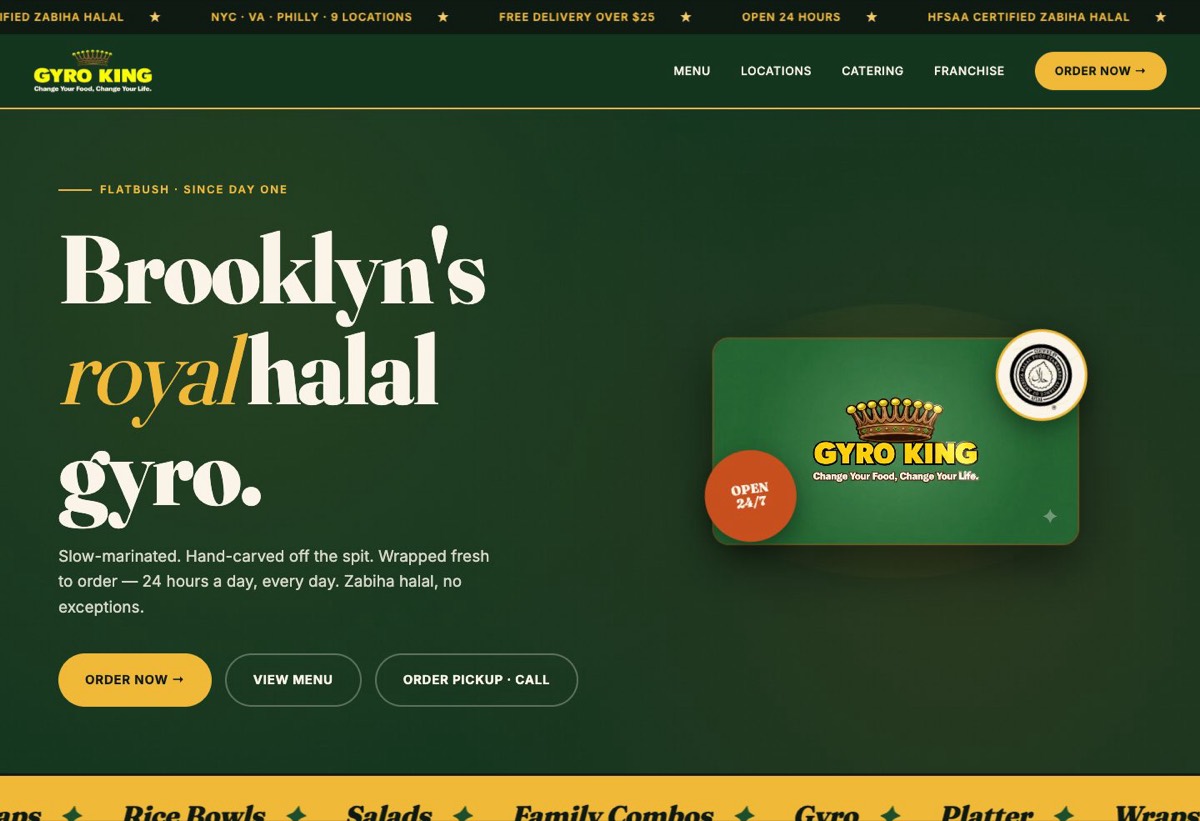
On the Gyro King website we built, the top of the page says what they serve and where, shows that they are open around the clock and zabiha halal, and puts Order Now, View Menu and a call-to-order button right there. A hungry person does not have to scroll to act.
The pages every small business site needs
- Home: who you are, where you are, and the main action.
- One page per service or product line. A page about each thing you sell is how you show up when people search for that thing.
- Menu, price list or catalog, if you have one, as real text on the page, not a PDF or a photo of a menu.
- About: the owner, the team, how long you have been in the neighborhood. People like to know who they are dealing with.
- Contact: phone, email, address, hours, a map, and a short form.
- Your real work: photos of dishes, finished jobs, products or happy events, so visitors can see what they will get.
Make it easy to get in touch
- 01
Tap to call
Put your phone number in the header on every page, and make it a link that dials when tapped. Many local customers would rather call than fill in a form.
- 02
Book or order online
If people can book an appointment or order food, link straight to it from the top of every page. Every extra step loses someone.
- 03
A short form
Name, phone or email, and a message. Ask only what you need to reply. Long forms get abandoned.
- 04
Messaging
If your customers already message you on WhatsApp or Instagram, give them a button for it. Meet people where they already talk.
What helps you get found on Google and AI search
You do not need tricks. Google and AI answer tools like ChatGPT and Perplexity look for pages that clearly answer what people are asking. A few basics cover most of it:
- A clear title on each page that says what it is and where, for example the service and the borough.
- Your business name, address and phone written the same way on your site, your Google Business Profile and anywhere else you are listed.
- Short, honest answers to the questions customers ask you most: do you deliver, do you take walk-ins, what areas do you cover.
- Descriptive alt text on photos, which also helps visitors who use screen readers.
- A link from your Google Business Profile to your website, and from your website back to your reviews.
If you are working on your map listing too, our guide on how to show up on Google Maps in New York covers that side.
A good small business website answers the customer's question before they have to ask it, then makes the next step one tap away.
What to own, and what to skip
Own your domain name, and make sure the website, hosting and email accounts are in your name, with your login. We regularly meet owners who cannot change their own site because a past designer or relative holds the password. Fixing that later is painful.
Skip the things that look impressive but slow people down: autoplaying intro videos, sliders that rotate before anyone can read them, pop-ups that cover the page the moment it opens, and stock photos of people who do not work for you. Make the site accessible, too: readable contrast, labels on forms, and alt text on images. It helps every visitor, and it matters legally for US businesses.
Finally, keep it current. Hours, menus, prices and photos change. A site that shows last year's menu or old holiday hours costs you trust. Whoever builds your site should make it easy for you to update the basics yourself.